

Service area business SEO comes down to five moves, in this order: configure Google Business Profile correctly, build a few genuinely local service area pages, mark them up with proper schema, collect reviews that mention specific neighborhoods, and track results with location-level data instead of one blended average rank. Skip the order and you'll waste months chasing a single "average position" number that hides what's actually happening in each town you serve.
Here's what to do in the next 72 hours:
- Hide your street address in Google Business Profile if you don't accept walk-ins, and define your actual service area by city or zip code.
- Pick one underserved suburb or region and draft a single, detailed service area page for it, not a template you'll copy six times.
- Pull your current Google reviews and flag which ones mention a specific location. If none do, start asking.
- Check whether your NAP (name, address, phone) matches across your website, GBP, and top three directories.
If you'd rather have someone audit this in an afternoon than spend a weekend on it, a short agency audit can flag what's broken before you build anything new.
Key Takeaways
Service area business SEO succeeds when a correctly configured Google Business Profile, a small set of genuinely local service area pages, and location-specific reviews all reinforce each other.
| Point | Details |
|---|---|
| Fix GBP first | Hide your address if you're not walk-in and set an accurate, realistic service area. |
| Build fewer, better pages | Three to seven detailed service area pages beat a dozen templated city swaps. |
| Mark up territory with schema | Use LocalBusiness and areaServed JSON-LD so search engines read your coverage correctly. |
| Track location-level data | Use GBP Insights, Search Console, and GA4 instead of one blended average rank. |
| Consider agency support | Harboursidedigitalmarketing offers a 30-day, no-lock-in trial for audit and execution help. |
Where to Go Next for Service Area SEO Guidance
- Google Business Profile help center for official setup rules.
- BrightLocal's service area page guide for page structure examples.
- Search Engine Land's SAP guide for anti-doorway best practices.
- Schema for structured data specifics.
Start your first audit with BrightLocal if you want local rank-grid detail, or Semrush if you want broader position and citation tracking in one place.
Table of Contents
- What Is a Service Area Business, and How Does Its SEO Differ?
- How Do You Set Up Google Business Profile for a Service Area Business?
- How Do You Build Service Area Pages That Actually Rank?
- How Do You Set Up Schema and Technical SEO for Service Area Pages?
- How Do You Build Citations and Reviews Across a Service Area?
- How Do You Measure Whether Your Local SEO Is Working?
- When Should You Add Paid Ads to Your Local SEO Strategy?
- How HarbourSide Digital Helps Service-Area Businesses Get Found
- Sources
What Is a Service Area Business, and How Does Its SEO Differ?
A service area business, or SAB, travels to the customer instead of the customer coming to a storefront. Plumbers, electricians, mobile detailers, pest control techs, and landscapers all fall into this category. A plumber covering six suburbs from a single unmarked warehouse is an SAB; a plumbing supply store with a retail counter is not.
The SEO playbook changes because the ranking mechanics change:
- Storefront businesses lean on proximity: Google shows a map pin, and nearby searchers see them first.
- SABs don't get that proximity boost the same way, since there's no public storefront to anchor the pin to.
- Google's own guidance tells non-walk-in businesses to hide their physical address and instead define a shaded service area on the map.
- Because there's no pin advantage, service area pages carry more of the ranking weight for SABs than they do for storefronts.
That last point is the one most owners miss, and it's why the rest of this guide leans so heavily on getting those pages right.
How Do You Set Up Google Business Profile for a Service Area Business?
Your Business Profile is the foundation, and getting it wrong doesn't just cost you rankings. It can get your listing suspended. Here's the sequence that works:
- Claim and verify your listing through the standard Google verification flow (postcard, phone, or video, depending on your category).
- Go to the business information section and hide your address if you don't accept customers at a physical location. Google will replace the pin with a shaded service area.
- Set your service area by listing the specific cities, suburbs, or zip codes you cover. Don't just draw a giant radius.
- Choose one primary category that matches your core service exactly (e.g., "Electrician," not "Contractor"), then add relevant secondary categories.
- Add every service you offer under the Services tab, using the same language customers actually search for.
- Write your business description around real service keywords and the areas you cover, without stuffing it full of city names.
- Upload photos from actual jobs, ideally geotagged where the platform allows it, since generic stock photography does nothing for local trust.
- Link each service listed in your profile to its matching service area page on your website, not your homepage.
A few policy traps catch owners every year. Don't create multiple listings for the same business to "cover more territory." Don't use a virtual office, a UPS mailbox, or a relative's address just to get a pin on the map. And don't set your service area wider than you'd realistically drive. Google's own thinking here roughly follows a two-hour drive rule: if a customer three hours away can't reasonably be served, don't claim that territory.
Pro Tip: Check your GBP service area against your actual job history for the last six months. If you've never done a job in a suburb you've listed, drop it. Padding your service area with aspirational territory dilutes relevance in the areas where you actually have work.
A quick dos and don'ts recap:
- Do hide your address if you're not walk-in.
- Do match categories to what you actually do, not what sounds impressive.
- Don't run duplicate profiles for the same legal business.
- Don't list a service area you can't realistically service same-day.
How Do You Build Service Area Pages That Actually Rank?
Service area pages, often shortened to SAPs, are the individual pages on your site built for each city, suburb, or region you serve. Done right, they capture searches like "emergency electrician [suburb name]" that your homepage will never rank for on its own. Done wrong, they're the fastest way to get flagged for doorway-style duplicate content, which can drag your whole site down.
A workable template looks like this:
- URL pattern: yoursite.com/service-area/[city-name] keeps things clean and scalable.
- Title tag: "[Service] in [City] | [Business Name]" — specific, not generic.
- H1: A variation on the title tag that reads naturally, not a copy-paste.
- Meta description: Mention the service, the city, and one differentiator (response time, licensing, guarantee).
- On-page sections: the local problem you solve, the specific services offered there, proof you've worked in that area, and a clear call to action.
The proof section is where most SAPs fail. BrightLocal's research on service area page SEO found that pages built by swapping only the city name rarely rank or convert, because there's nothing on the page that couldn't apply to any other town. Real local proof looks like a case study from a job in that specific suburb, a photo of your van parked outside a recognizable local landmark, a testimonial from a customer who lives there, or a mention of a local regulation you handle (council permit requirements, HOA rules, whatever applies to your trade).
Here's a rough before-and-after that plays out often in this work: a residential electrician builds five templated city pages, each with the same 200 words and a swapped city name. Six months later, none of them rank past page three. The fix isn't more pages. It's fewer, better ones: two of those five get rebuilt with real local case studies and photos, and within three months, those two start pulling in map-pack visibility and direct calls the templated versions never generated.
Pro Tip: If a cluster of small neighborhoods shares the same demographics and you don't have distinct local proof for each one, group them into a single page instead of forcing five thin pages. A great serves-many-suburbs page beats five weak ones every time.
How Do You Set Up Schema and Technical SEO for Service Area Pages?
Search engines can't infer your territory just from prose. You need to tell them explicitly, and that's what structured data is for. Schema includes an areaServed property built exactly for this purpose, and pairing it with a GeoShape can mirror the actual service polygons used by dispatch or routing software when precision matters.
Here's a stripped-down JSON-LD example for a single service area page:
{
  "@context": "https://schema.org",
  "@type": "LocalBusiness",
  "name": "Example Plumbing Co.",
  "areaServed": {
    "@type": "City",
    "name": "Riverside"
  },
  "telephone": "+1-555-0100",
  "priceRange": "$$"
}
Beyond schema, a short technical checklist keeps these pages from getting lost or penalized:
- Set a self-referencing canonical tag on every SAP so Google doesn't merge near-duplicate pages incorrectly.
- Confirm each page is indexable (not blocked in robots.txt, not marked noindex by accident).
- Check mobile page speed specifically, since most local searches happen on a phone in the field.
- Link every SAP from both your homepage navigation and a service-area hub page, and include them in your XML sitemap.
| Schema element | Where it's used |
|---|---|
LocalBusiness | Base type declaring what kind of business this is |
areaServed | Names the specific city, region, or zip covered |
GeoShape | Optional, for precise multi-hub service polygons |
Pro Tip: Run your JSON-LD through Google's Rich Results Test before publishing. A single typo in the schema can make the whole block invalid, and you won't get an error message telling you why your rich results aren't showing up.
How Do You Build Citations and Reviews Across a Service Area?
Citations, listings of your business name, address, and phone number on third-party directories, still carry weight for local trust, and consistency matters more than volume. Start with the big general directories, then move to trade-specific ones (HVAC associations, licensing boards, industry directories relevant to your trade). Every listing needs to match your GBP exactly: same business name, same phone format, same service description. One directory listing an old address is enough to create doubt in Google's local algorithm.

Reviews do double duty now. They build trust with prospective customers, and they increasingly feed AI-driven local recommendation systems that weigh sentiment and geographic mentions more heavily than they used to. A review that just says "great service" helps less than one that says "fixed our hot water system in Riverside within two hours of calling."
A simple review request script that nudges toward location specificity: "Thanks for choosing us for your [service] in [suburb]! If you have a minute, we'd love a review mentioning how it went, especially if there's anything specific about working in your area that stood out."
- Claim your top three general directories first, then trade-specific listings.
- Audit NAP consistency quarterly, not just at setup.
- Ask for reviews within 24 hours of job completion, when the experience is freshest.
Pro Tip: Once you have three or more reviews mentioning a specific suburb, feature them on that suburb's service area page with review schema markup. It closes the loop between the proof Google sees and the proof a human visitor sees.
How Do You Measure Whether Your Local SEO Is Working?
Blended average rank is close to useless for an SAB, since visibility can look completely different fifteen minutes apart by car. Track these instead:
- GBP Insights for impressions, calls, and direction requests, broken down by area where possible.
- Google Search Console for location-specific query data on your SAPs, not just overall clicks.
- GA4 for actual conversions from organic service area page traffic.
- Call tracking if you're also running paid ads, so you can separate paid from organic leads.
For tooling, Semrush handles broad position tracking and citation audits well, BrightLocal specializes in local rank grids that show how visibility shifts across your actual territory rather than one average number, and Moz offers useful local search insight tools for ongoing audits.
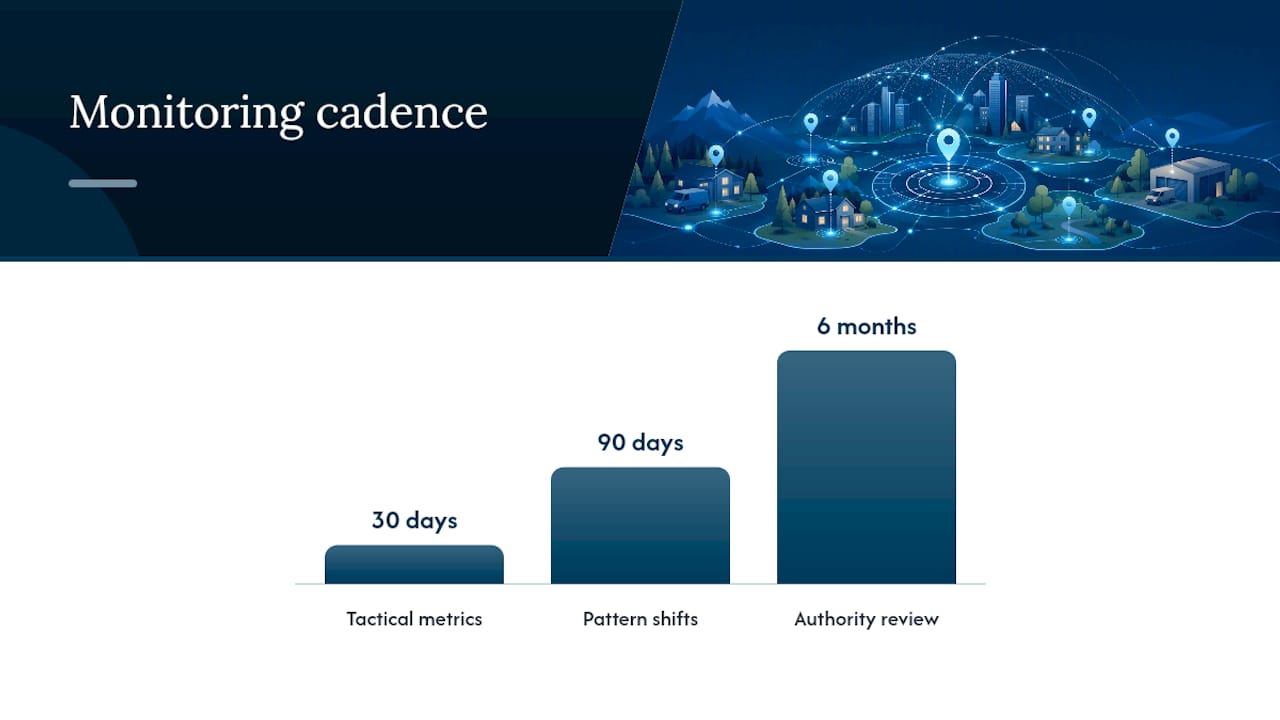
A workable cadence: check tactical metrics (calls, GBP actions) every 30 days, look for pattern shifts every 90 days, and do a full authority review every six months.
When Should You Add Paid Ads to Your Local SEO Strategy?
Organic SAPs and GBP work take months to mature. If you're covering a genuinely competitive market or have a geography where organic hasn't caught up yet, paid can fill the gap while you build.
- Use Local Services Ads when you need fast lead volume in a highly competitive service category and want pay-per-lead pricing instead of pay-per-click.
- Use local PPC when you want more control over ad copy and landing pages for a specific, high-value service.
- Stick to organic-only if your market is less competitive and you have the patience for a longer build.
BrightLocal notes that Local Services Ads work well as a complement to organic SAP work precisely because SABs face that proximity disadvantage storefronts don't.
Pro Tip: Before building out five new SAPs, run a two-week Local Services Ads test in that territory. If leads come in at a reasonable cost, it's a strong signal the organic investment will pay off too.
How HarbourSide Digital Helps Service-Area Businesses Get Found
Most owners running a service-area business don't have time to audit GBP settings, write locally specific page content, and build schema on top of running actual jobs. That's the gap agency support is meant to close.
- Start with an audit of current GBP settings, existing pages, and citation consistency.
- Build a prioritized set of service area pages for your highest-value territories first, not a mass rollout of thin pages.
- Optimize GBP categories, services, and service area boundaries to match real job history.
- Set up a review and citation plan that targets specific neighborhoods over time.
- Put measurement in place from day one so you can see what's actually moving.
Explore the full breakdown on the services page, and if you want to test the process without commitment, ask about the 30-day trial with no lock-in.
Common Mistakes and Realistic Timelines for Service Area Businesses
Most trouble comes from three habits: publishing thin, city-swapped pages with no real local proof, claiming a service area far wider than the business can actually cover, and treating reviews as an afterthought instead of a location-tagging opportunity.
Expect early signals (GBP impressions, initial calls) within 30 days, pattern shifts in rankings by 90 days, and meaningful authority gains by 180 days. Be wary of any agency promising instant map-pack dominance, mass-producing dozens of city pages overnight, or offering suspiciously cheap bulk citations. Those are shortcuts that tend to collapse later.
Get Local SEO Support Without a Long-Term Commitment
Harboursidedigitalmarketing is the alternative to hiring a traditional agency retainer for service area SEO: no long contract, a 30-day trial to see real results first, and a setup that scales from a single GBP fix to a full service area page build. Sydney business owners running plumbing, electrical, landscaping, or any trade that travels to the customer can start with a straightforward audit rather than a sales pitch.
If you're not sure whether your GBP is costing you calls or your service area pages are thin enough to hurt you, get a quick audit before spending on anything else. Check the pricing and trial details to see what a no-lock-in start actually looks like, and go from there.
Sources
- Represent your business on Google - Google Business Profile Help
- How to Do Service Area Page SEO for Local Search Visibility - BrightLocal
- Service area pages: Boost local SEO across locations
- Schema